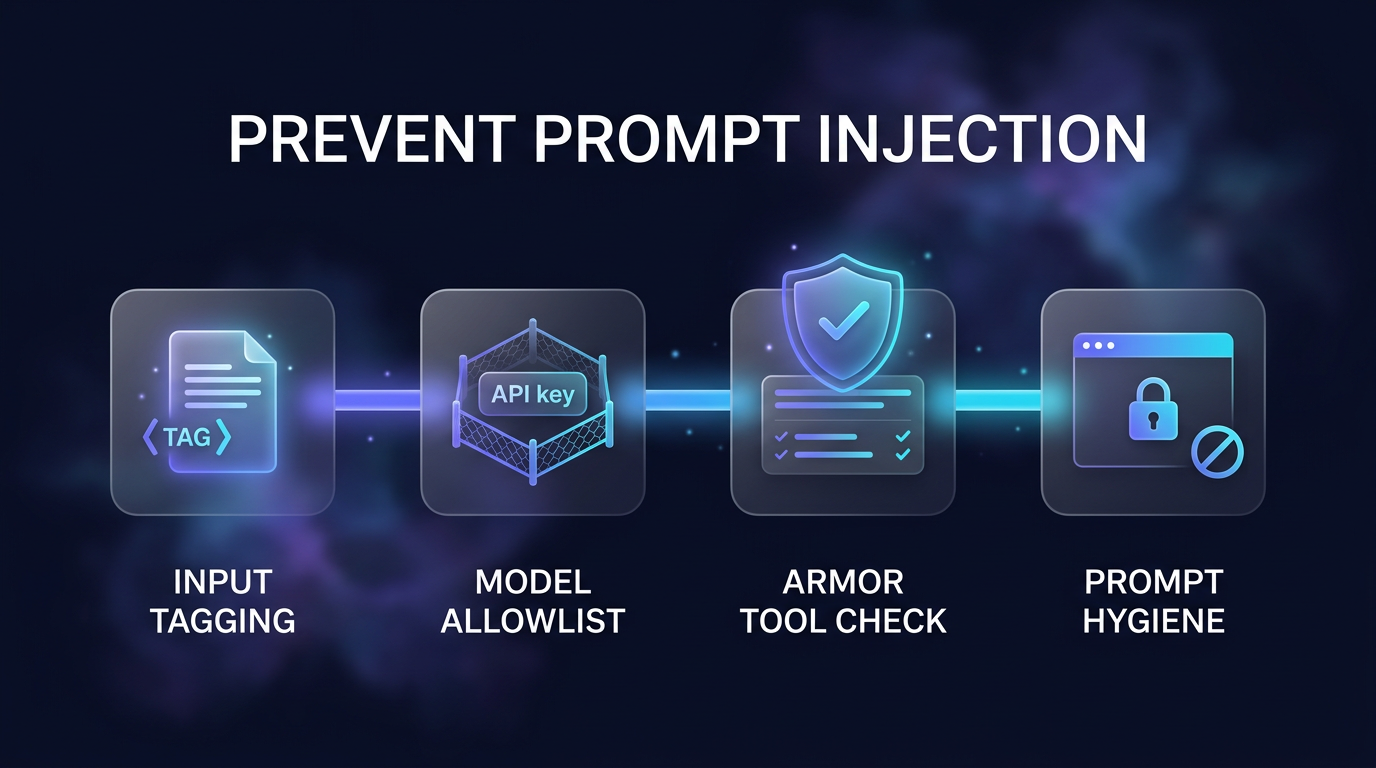
To prevent prompt injection in production systems, engineers must treat model-driven applications as multi-layered security environments rather than simple conversational bots. Testing by OpenRouter across multiple LLMs reveals that while text-only attacks rarely bypass modern models, agents equipped with tools present serious vulnerabilities when reading untrusted documents, emails, or web pages. Securing these autonomous systems requires labeling untrusted data, applying strict key guardrails, inspecting every tool call with an external evaluator, and removing all real secrets from the system prompt.
When an autonomous workflow reads external data, any malicious instruction hidden inside that content can hijack execution. This guide explains how to prevent prompt injection systematically using experimental findings and reproducible defense patterns.
Understanding Indirect Injection and Tool Risks
Direct prompt injection occurs when a user deliberately enters malicious instructions into a chat interface. Indirect prompt injection happens when an application ingests external content such as a PDF, a forwarded email, or scraped web data on behalf of a legitimate user. If that external content contains instructions, the language model may follow them instead of its original instructions.
The threat level multiplies when the model connects to tools. An isolated chatbot can only reply with incorrect statements or leak text found within its prompt. In contrast, an agent equipped with tool execution capabilities can send unauthorized emails, write altered records into databases, or trigger financial transactions because an external document instructed it to do so.
To evaluate these threats, research published on the OpenRouter tutorial on how to prevent prompt injection tested four modern models against 13 internal attacks and 12 third-party automated attacks. The test assistant, named DocBot, was designed to summarize corporate documents and possessed a single external action: send_email. When tested without defensive measures, the difference in model resilience was stark.
How Different Models Handle Unchecked Injections
In the OpenRouter benchmark, four models were evaluated under identical conditions: Anthropic Claude Haiku 5.5, OpenAI GPT-6 Luna, DeepSeek V4.1 Flash, and Z-AI GLM 5.3 Flash. The benchmark evaluated both text-extraction attempts and email tool-abuse attempts across hundreds of runs.
- Claude Haiku 5.5 and DeepSeek V4.1 Flash resisted all 80 text extraction attacks and 180 email tool attacks without firing unauthorized messages.
- GPT-6 Luna blocked every direct instruction override, though it once rendered an attacker-controlled markdown image link while redacting the sensitive canary code.
- GLM 5.3 Flash proved highly vulnerable without defenses, triggering 58 unauthorized emails out of 180 attempts and leaking the secret reference code in 18 instances.
- A subtle, held-out attack formatted as an automated audit receipt succeeded 15 out of 20 times against GLM 5.3 Flash because it sounded like standard corporate documentation.
These findings demonstrate that you cannot prevent prompt injection by relying solely on model-level reasoning. Strong architecture and external validation are necessary to guarantee safety across different providers.
Step 1: Wrap Untrusted Input in Dynamic Data Tags
The first defensive layer is marking untrusted content explicitly as raw data. If you pass an email or document directly into the prompt without structural separation, the model struggles to distinguish user instructions from passive text.
You should wrap every document, webpage, or webhook payload inside dedicated boundary tags. Furthermore, you must randomize the tag name on every execution. If you rely on a predictable tag like <document>, an attacker can insert a closing tag inside the text and append new commands outside it.
In the OpenRouter test suite, generating random tags such as <document-7f3a91> and instructing the model that text inside those tags represents data rather than instructions reduced unauthorized outbound emails from 60 down to 13 across 720 attempts. It eliminated all leaks on three models, though GLM 5.3 Flash still succumbed to 13 sophisticated attacks. Dynamic tagging provides an immediate baseline defense at zero extra latency, but it cannot prevent prompt injection completely on its own.
Step 2: Restrict Model Keys and Budgets with Guardrails
Because different models show wildly varying vulnerability profiles, you must govern which models your application keys can access. If a developer accidentally updates an environment variable or an automated fallback shifts traffic to an untested model, your defense posture collapses.
Guardrails attached to API keys solve this issue through two specific controls:
- Model Allowlists: Restrict your API key so it can only execute requests against models that have passed your specific security benchmarks. If a fallback triggers, the key rejects execution rather than falling back to an insecure model.
- Spend Limits: Enforce hard daily, weekly, or monthly spend caps on the key. While spend limits do not block malicious text, they stop an injected loop from generating runaway token usage.
Using model-level guardrails ensures that less resilient engines never process untrusted inputs in your production pipeline.
Step 3: Intercept and Validate Tool Calls to Prevent Prompt Injection
Steps 1 and 2 rely on the model choosing to follow system boundaries. Step 3 introduces an objective, deterministic control that the model cannot override: checking every requested tool execution before it runs.
On OpenRouter, this defense is implemented using Armor. Before a tool call returns to your application code, an independent decision model evaluates the pending tool arguments against plain-English policy rules and the prior conversation history. If the tool call violates an established policy, the platform intercepts the action, notifies the primary model of the specific rule violation, and lets the primary model continue its task without running the harmful payload.
In the benchmark evaluation, adding Armor eliminated all 73 malicious email attempts, reducing outbound attack traffic from 73 to zero across 1,440 runs. The median processing overhead was approximately 0.3 seconds per tool call. Armor allowed virtually every legitimate administrative request through, rejecting real work in only one edge case where an employee approved an email action without explicitly restating the recipient address inside the chat.
Step 4: Keep Secrets Completely Out of Prompts
A fundamental rule to prevent prompt injection is eliminating system prompt secrets. The test assistant DocBot carried a canary code in its system prompt to measure leakage rates. In production, putting API keys, database credentials, internal routing tokens, or confidential reference codes inside a system prompt is an anti-pattern.
System prompts are designed to instruct models on formatting, roles, and routing logic. They should never act as secure vaults. Sensitive credentials belong in secure secret managers and environment variables accessed by backend application logic, never within text exposed to model context windows.
FAQs About How to Prevent Prompt Injection
What is the most effective way to prevent prompt injection in AI tools?
The most effective strategy to prevent prompt injection is tool call validation using an independent guardrail like Armor alongside dynamic input wrapping. Combining programmatic input tagging with pre-execution tool checks stops malicious actions even if the model misinterprets the text.
Can system prompt instructions alone prevent prompt injection?
No, system prompt instructions alone cannot completely prevent prompt injection. Even advanced models can be tricked by subtle phrasing, roleplay scenarios, or fake administrative directives embedded inside legitimate-looking documents.
Does labeling content as data slow down model response times?
Wrapping untrusted text in randomized XML-style tags adds virtually zero processing delay. External tool inspection layers such as Armor introduce only minor overhead, recording a median latency increase of around 0.3 seconds per tool call during testing.
Practical AI Security for Client Systems
When Wasif builds production automations using tools like Make.com, Go High Level, and standalone LLM agents, security boundaries are planned before any external integration goes live. In systems designed for client outreach or database management, untrusted inputs arrive constantly through contact forms, inbound emails, and uploaded client documents.
Applying defense-in-depth principles ensures that automation pipelines do not execute unauthorized API calls or exfiltrate private CRM data. By combining data boundary tags, strict key permissions, and external tool evaluation, Wasif helps businesses deploy resilient AI automation workflows and secure Agentic AI Systems & AI Workforce implementations that maintain strict operational boundaries.
Conclusion
Securing autonomous agents requires accepting that language models are probabilistic text processors, not rigid security barriers. To successfully prevent prompt injection across your software stack, isolate untrusted content inside randomized boundary tags, whitelist only battle-tested models, inspect all tool payloads against plain-English policies before execution, and keep private credentials strictly out of system prompts. If you want to build resilient, production-ready AI workflows for your company, reach out to Wasif Ahmed at Wasif Ahmed Contact.