Users who rely on Google’s Gemini app can now preview and edit generated files without switching between multiple browser tabs. With this capability, the option to let Gemini edit documents directly inside the conversational window changes how teams interact with generated text, data sheets, and code blocks.
As announced on the Google blog, the Gemini app now supports generating, previewing, and editing documents, PDFs, presentations, spreadsheets, and code right inside the conversation stream. Rather than exporting content immediately to external software to make simple revisions, users can adjust drafts directly within the chat workspace.
How Gemini Edit Documents Features Work Across Different Formats
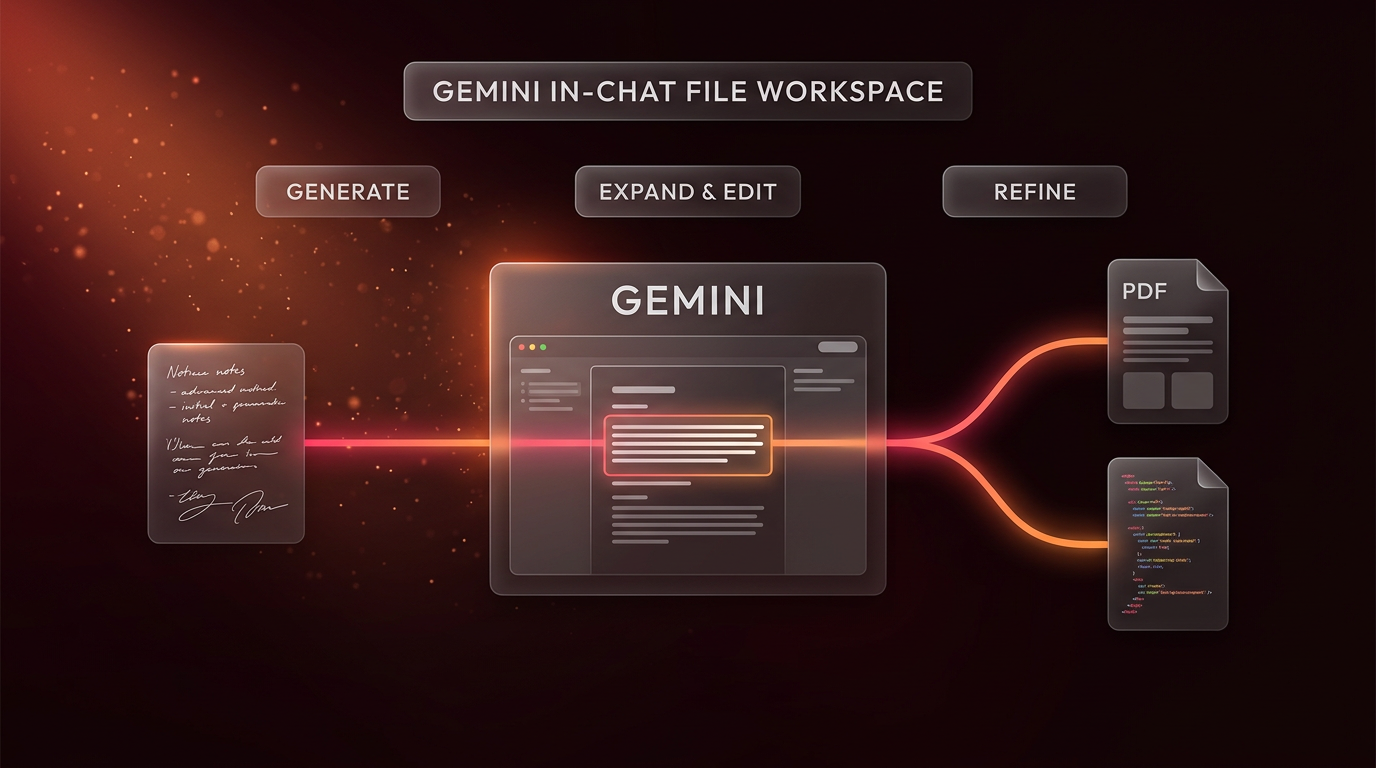
The core update allows users to inspect generated outputs without downloading them first. When an output appears, users can expand the file to full screen to type manual edits, highlight specific lines to ask follow-up questions, or prompt the model to rewrite selected paragraphs. This workflow bridges the space between basic prompt generation and active file editing.
For example, Google demonstrated that Gemini can process uploaded handwritten lecture notes to create a structured PDF study guide. Once the guide is generated, users do not need to settle for a static file. They can review the PDF, expand it to full screen, manually type corrections into the text, or highlight sections so Gemini can revise the explanations directly.
By enabling users to let Gemini edit documents in the same interface where ideas are drafted, the update reduces back-and-forth context switching. Users keep their reference materials, chat history, and editable files in one central thread.
This layout prevents accidental file divergence. In traditional workflows, exporting a draft to an external editor creates a separate version that is detached from the prompt thread. If the user later returns to the chat to request structural updates, the model lacks visibility into the manual adjustments made off-platform. Keeping the draft editable within the chat retains context across successive prompts.
Platform Availability and Supported Formats
Google has made these file capabilities widely accessible across territories. The features are available to all users in all languages where the Gemini app is currently offered. However, the exact editing experience varies depending on the device and format being used.
- PDF Documents: Full previewing and manual editing capabilities are supported on both web browsers and mobile devices.
- Spreadsheets and Presentations: Slide decks and Google Sheets formats are supported for in-chat generation and editing exclusively on the web.
- Word Processing and Text: Google Docs formats, plain TXT files, and Markdown documents can be previewed and revised on the web.
- Code Files: Generating, expanding, and editing code files is supported on the web interface.
Understanding these platform differences helps users plan where to run specific workflows. Mobile users can reliably review, highlight, and adjust PDF documents while on the move, whereas complex spreadsheet adjustments or presentation layouts require the web browser.
When users choose to have Gemini edit documents on the web interface, the workspace accommodates wider multi-column layouts and comprehensive toolbars. On mobile interfaces, screen space is naturally constrained, which explains why Google prioritized PDF interactions for handheld devices while keeping data-heavy and code-heavy tasks on desktop browsers.
How Gemini Edit Documents Workflows Enable Targeted Refinement
In previous iterations, requesting changes to a generated draft often meant asking the model to rewrite the entire response from scratch. This frequently introduced unwanted alterations to parts of the text that were already accurate.
The updated system introduces targeted iteration. When you work with Gemini edit documents workflows, you can highlight a single sentence or a single paragraph to ask targeted questions about that specific section. Gemini then processes the request while preserving the remainder of the file structure.
Full-screen expansion also gives users manual control. If a title needs an immediate spelling correction or a spreadsheet cell requires a quick number update, users can type those changes directly without sending an additional prompt. This hybrid approach combines automated generative assistance with manual text editing.
Manual adjustments inside the full-screen view do not break the session state. A user can type an introductory sentence by hand, then select a subsequent section and request a more concise explanation from the model. The model reads the current state of the document, accounting for both manual edits and preceding chat prompts.
This selective editing model reduces common verification overhead. When an entire document is regenerated, reviewers must read every paragraph again to ensure that factual statements or specific phrasing were not dropped. By confining automated updates to highlighted sections, the review scope remains manageable.
Practical Implications for Builders and Businesses
For independent builders and business operators, managing drafts across different client deliverables often creates fragmented file management. Bringing file inspection and revision into chat interfaces points toward a more cohesive documentation pipeline.
When handling rapid drafts, team members no longer need to copy code blocks into separate editors merely to check their syntax or adjust an argument. Similarly, drafting outlines in Markdown or compiling notes into structured text can be completed within the conversational thread.
The ability to let Gemini edit documents directly benefits teams handling multi-step content preparation. Drafts can be gathered from rough source materials, compiled into structured layouts, reviewed on screen, and adjusted in place before export. This setup reduces the friction of managing multiple provisional files on local storage drives.
While this tool provides convenience within the Google app interface, businesses looking to connect complex workflows across their CRM, messaging platforms, and databases often combine these tools with broader AI automation architectures or multi-step Agentic AI Systems & AI Workforce solutions.
Standalone conversational interfaces serve isolated tasks well, but organizational productivity depends on predictable data movement across systems. When teams rely on ways to let Gemini edit documents during early discovery or draft creation, those drafts still require clean ingestion into operational backends, revision tracking repositories, and client delivery software.
Frequently Asked Questions
How does Gemini edit documents without leaving the chat?
When users direct the interface to let Gemini edit documents, the file opens in an interactive preview window directly in the thread. Users can expand that window to full screen to type manual corrections into the text, or they can highlight specific sentences to ask questions and request targeted revisions from the model.
Which file formats are supported on mobile devices?
PDF preview and editing is supported on both web and mobile devices. Other formats, including Google Docs, Google Sheets, presentations, Markdown, plain TXT files, and code, are supported only on the web version of the Gemini app.
Are these document editing features limited to specific languages?
No. Google has released these capabilities to all users across all languages where the Gemini app is currently supported.
Can users manually type into files while the Gemini app is open?
Yes. Opening a supported file in full-screen mode allows users to type direct textual edits into the document without sending a prompt to the model. Users can alternate between typing manual changes and asking the model to revise selected sections.
Where This Fits in Real Projects
Wasif designs automated business pipelines and operational architectures for teams seeking to remove friction from daily administrative tasks. While Gemini’s in-chat file editing simplifies everyday manual reviews, scaling operations typically requires integrating structured data directly into backend platforms and communication channels.
Standalone web tools provide rapid assistance for drafting individual assets. However, production workflows demand stable integrations between data sources, automated verification steps, and long-term storage systems. Wasif focuses on creating systems that bridge conversational interfaces with core enterprise infrastructure.
Whether evaluating how to let Gemini edit documents for internal drafting or structuring custom pipelines for high-volume operations, teams achieve the best outcomes when interface convenience aligns with durable data management. If you want to integrate reliable automated systems into your business operations, reach out to Wasif to discuss your project.