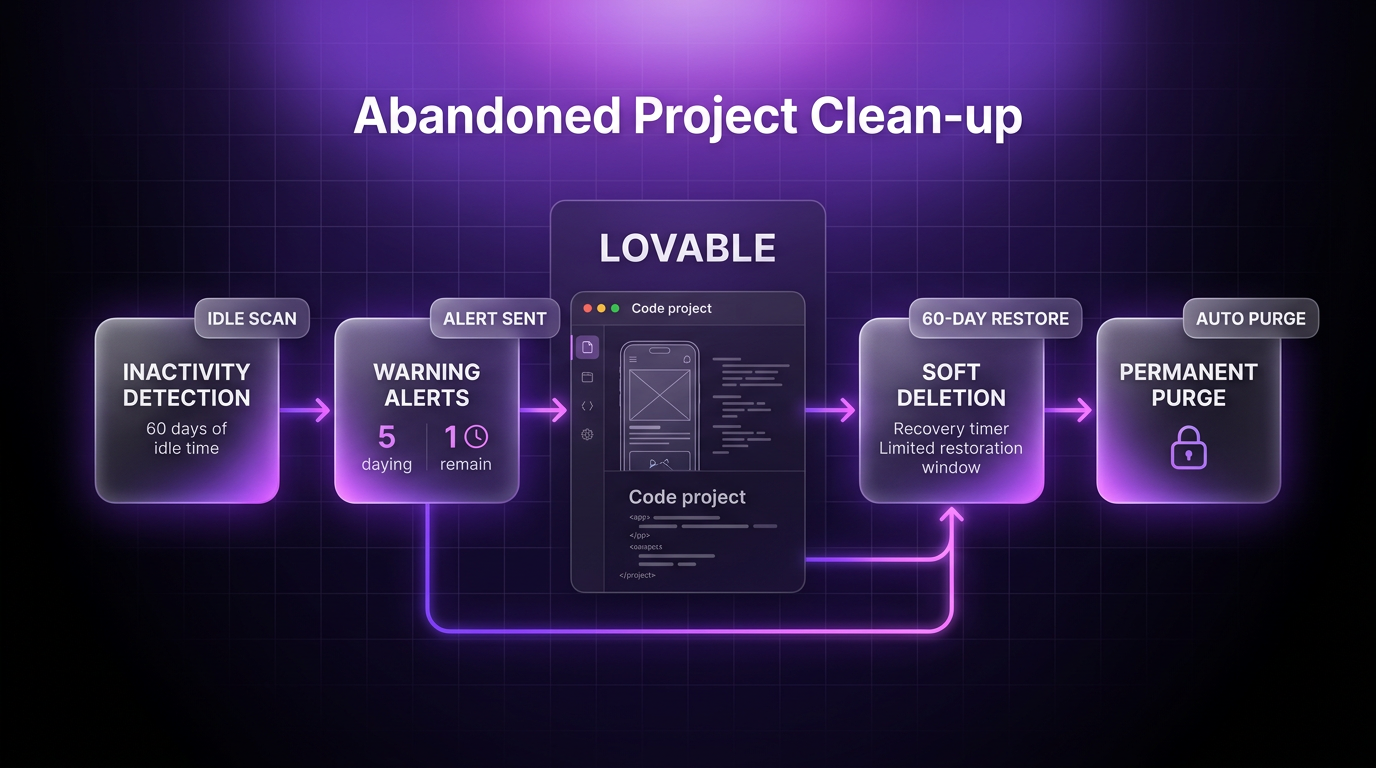
Lovable has introduced automated abandoned project clean-up for its Enterprise plan, giving engineering leaders and workspace administrators a direct way to curb software sprawl. As development teams rapidly prototype with generative platforms, workspaces often accumulate unmaintained applications, forgotten campaign landing pages, and one-off hackathon tools. These unmonitored builds frequently remain published on active URLs, exposing dormant credentials and outdated dependencies to security risks.
As announced on the Lovable blog, the new policy system addresses this sprawl by identifying idle applications and offering configurable retention workflows. Rather than forcing operations teams to manually audit hundreds of repositories, Lovable now automates tracking, notifications, and scheduled removal.
Understanding the Problem of App Sprawl
In modern software operations, rapid generation tools allow team members to spin up working applications in minutes. While this acceleration aids testing and delivery, it routinely creates shadow infrastructure. Workspace members create proofs of concept for specific client pitches, launch event registrations, or test internal tools, only to move on when the immediate requirement ends. Because there is little friction in leaving an app running, dozens of projects sit untouched for months.
These forgotten builds create measurable risks across multiple vectors:
- Stale credentials and active API keys connecting directly to internal company databases
- Unpatched third-party code packages that miss critical security patches over time
- Retained customer data and form submissions lingering past their legal or operational purpose
- Orphaned project ownership when creators leave teams without formally transferring administrative responsibilities
Without an automated abandoned project clean-up policy, organizations carry cumulative liability across environments they no longer actively monitor.
How the Abandoned Project Clean-up Workflow Operates
The abandoned project clean-up architecture functions in two sequential stages: activity detection followed by a configurable removal grace period. Workspace owners and security administrators configure the rules directly within workspace privacy and security settings.
By default, Lovable marks a project as abandoned after 60 days of inactivity. This status applies equally to published builds and unpublished draft projects. What counts as activity is clearly delineated: user editing sessions, active chat interactions inside the editor, non-bot web visits to the published application, and inbound calls to project backend functions. Opening a workspace or previewing an interface does not reset the 60-day timer, and republishing without changes does not count as ongoing use.
Once a project reaches abandoned status, administrators can enforce automatic deletion. Auto-delete remains turned off by default to prevent accidental data loss. When toggled on, workspace owners select a formal grace period of 7, 14, or 30 days before automated deletion executes.
Safeguards, Warnings, and Recovery Windows
Because permanent deletion impacts code history and configurations, the clean-up system provides explicit warnings before acting. Project owners and workspace collaborators with edit permissions receive automated email alerts and visible in-project warning banners at two checkpoints: five days prior to scheduled deletion and one day prior.
Anyone with valid edit permissions can stop the deletion sequence immediately. Interacting with the project editor, submitting a chat prompt, or clicking the Keep It option directly in the banner or warning email halts the process and resets the activity timer.
If a project passes the grace window without intervention, it enters a soft-deleted state. For 60 days, administrators can restore the build directly from the recently deleted projects dashboard. During this 60-day window, the published application is taken offline and its backend processes are paused. If 60 days pass without administrative restoration, Lovable permanently purges the project files, full version history, and associated chat logs.
Administrators should note one permanent consequence of deletion: once a project is removed, its original lovable.app subdomain is released back to the public pool. If a separate user registers that subdomain while the project sits in the recovery queue, restoring the original project will require selecting a different address.
Configuring Abandoned Project Clean-up in Workspace Settings
Enterprise administrators can activate and adjust the clean-up rules through four straightforward configuration steps:
- Navigate to Workspace Settings, select Security, and open the Privacy & Security section
- Open the Abandoned Projects management panel
- Define the inactivity threshold required to flag an idle build (preset to 60 days)
- Enable auto-delete and select the preferred grace period duration (7, 14, or 30 days)
Setting this governance structure establishes continuous hygiene across high-volume engineering teams without requiring repetitive manual oversight.
Where This Fits in Real Client Builds
In client implementations, Wasif Ahmed structures development pipelines to prevent infrastructure debt from accumulating across web tools and custom systems. When connecting generative builders to automated workflows or production environments built with AI automation and custom software development, setting automated data expiration and project lifecycles is just as important as the initial build.
Establishing rigid inactivity thresholds ensures that temporary testing endpoints do not remain exposed indefinitely. Automated clean-up policies allow teams to prototype freely while giving workspace leaders reliable governance over what remains active on company infrastructure.
FAQs
Which subscription tier includes abandoned project clean-up?
The abandoned project clean-up feature is exclusively available on the Lovable Enterprise plan. Workspace owners and administrators configure these settings under their organizational privacy and security panel.
What actions prevent an abandoned project from being deleted?
Any verified activity resets the countdown. Users can edit code, send a message in the editor chat, receive genuine user traffic on the live app, invoke backend functions, or click Keep It on warning notifications.
Can a deleted project be recovered after the grace period ends?
Yes, Lovable preserves deleted projects for 60 days in a soft-deleted state before permanent deletion. Workspace administrators can restore the build during this window, though the original subdomain may be claimed if another user registers it first.
Conclusion
Lovable’s abandoned project clean-up gives teams a structured, low-friction defense against app sprawl and unmonitored security exposure. By establishing clear inactivity triggers, multi-stage warning notices, and a 60-day recovery safety net, enterprise teams can maintain clean development environments without slowing down innovation. For organizations deploying custom AI architectures, setting up these automated retention rules should be part of standard onboarding.
To discuss your software architecture or integrate enterprise automation across your tech stack, contact Wasif Ahmed at wasifahmed.dev/contact.