Claude Tag personal connectors are now rolling out for team channels, allowing individual members to bring their own authenticated tools into collaborative discussions. On September 24, 2026, the update was announced on the Claude blog, expanding how the Claude Tag beta functions inside Slack. Previously, the assistant could only query tools explicitly attached to an entire channel by an administrator. This release changes that dynamic by letting individual team members query private files, calendars, and CRM records in public threads without exposing their underlying credentials to teammates.
The Key Changes to Claude Tag Personal Connectors
Before this update, Claude Tag functioned strictly within channel boundaries. If an administrator connected a channel to GitHub, Claude could inspect repositories and pull requests for anyone in that room. However, if a task required cross-referencing an engineering roadmap saved in an individual engineer’s personal cloud drive, the workflow halted. Admins routinely restricted channel-wide integrations to avoid granting wide data access to every observer in a channel.
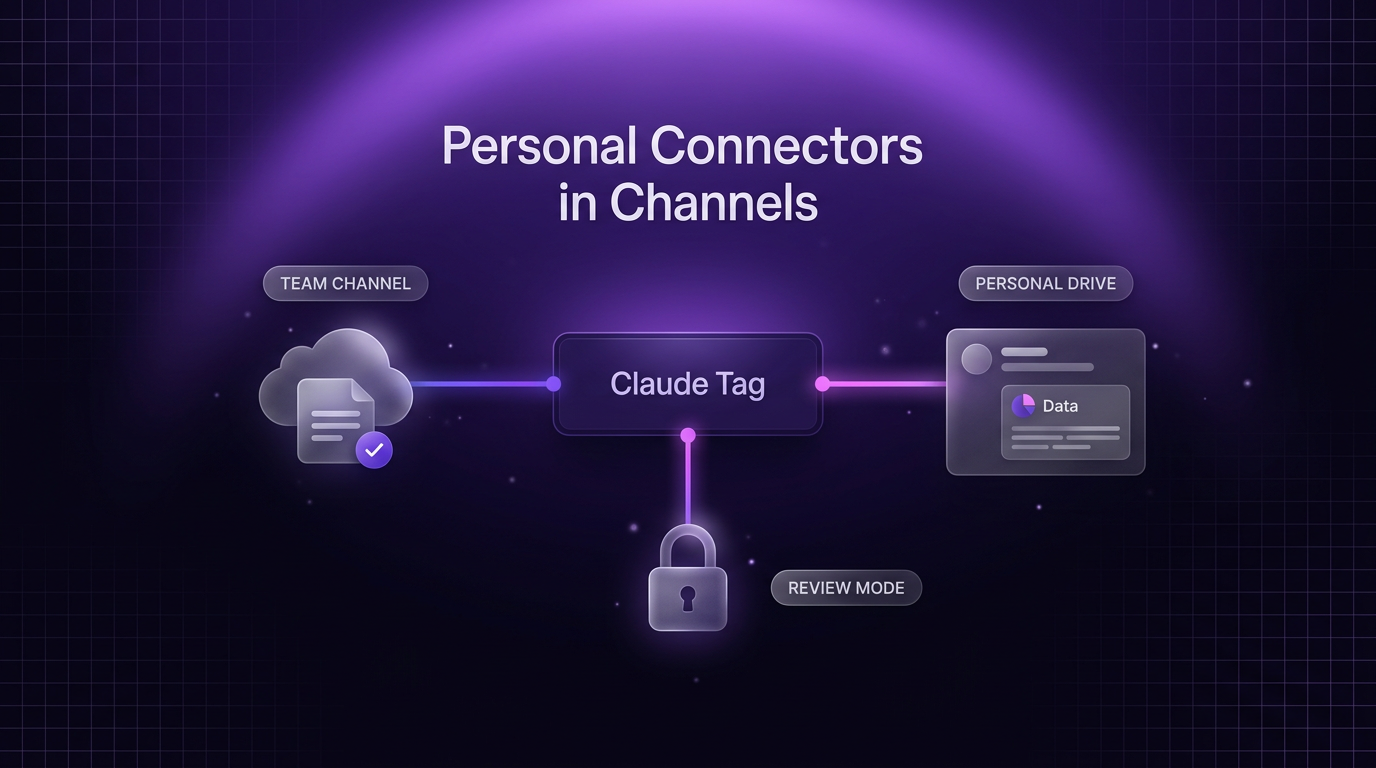
The arrival of Claude Tag personal connectors resolves this boundary problem. Members on Team tiers can now link individual accounts, such as Google Drive, personal calendar schedules, staging servers, and CRM dashboards. When you mention the assistant in a channel, it can access both the channel-level integrations and your own authenticated resources to formulate an answer.
Control remains tied to the individual account rather than the room. Other members of the channel cannot prompt Claude to search your personal connector directly. The connection responds only when invoked by the person who authorized it, preserving existing enterprise access limits and role-based permissions.
How Review Mode and Governance Function
Sharing private context in public team channels naturally introduces privacy considerations. To manage visibility, the system provides two distinct operating modes for posting responses:
- Review Mode: Claude drafts the response privately and displays an inspection prompt before publishing anything to the channel thread. You inspect the exact data Claude pulled from your personal tool and confirm whether it is safe for team viewing.
- Auto Mode: Claude evaluates the generated response automatically. If the system detects sensitive data, it diverts the message to a review prompt. If no sensitive material is flagged, it posts the answer directly into the active channel thread.
Governance controls extend to organizational administrators as well. On Enterprise plans, administrators will be able to require review mode for all channel members across the organization. Security logs also remain clear: actions taken through an individual connection appear in that application’s audit logs under the user’s personal identity, while channel-wide queries remain recorded under the channel service account.
Why Personal Connectors in Channels Matter for Real Teams
Collaborative problem-solving frequently stalls because contextual documentation sits behind personal logins. In typical software development and client management setups, individual specialists hold private access to task trackers, draft proposals, and staging servers that teammates cannot view directly.
Consider an engineering team preparing a deployment in a channel connected to GitHub. A lead engineer asks Claude to evaluate merged code against an architectural outline saved in their private Google Drive folder. With Claude Tag personal connectors active, the assistant references the repository using the channel connector, inspects the private outline via the engineer’s personal connector, and outputs a checklist of completed and outstanding tasks. The engineer retains the option to screen the output in review mode before the rest of the room reads it.
This structure bridges the gap between shared workspace communication and strict least-privilege security policies. Teams do not need to grant broad read permissions across an entire department simply to let an AI assistant retrieve a timeline or summarize a client contract.
Where Channel Connectors Still Apply
While Claude Tag personal connectors handle on-demand human requests, they do not replace shared channel connectors. Personal connections do not operate unattended. Scheduled background automations, scheduled status updates, and proactive alerts triggered by external webhooks continue to rely on admin-configured channel connectors.
For example, an on-call incident response channel requires shared access to server monitoring tools, deployment histories, and central runbooks so the assistant can triage alerts overnight when staff members are offline. Conversely, ad-hoc tasks like compiling custom client bids or auditing private pipeline numbers remain well-suited for personal connections, where a team member supervises every piece of surfaced information.
Frequently Asked Questions About Claude Tag Personal Connectors
How do Claude Tag personal connectors handle data privacy?
Claude Tag personal connectors operate under individual authentication tokens, meaning only the user who connected the tool can trigger queries against it. Responses can be held in review mode so you can inspect generated text before it posts to the public channel, and underlying data logs reflect your personal user account.
Can other team members query my personal connector in a shared channel?
No, other teammates cannot invoke or search your personal connectors. When another team member tags Claude in the same channel thread, Claude cannot read your personal connectors unless that user also holds authorized access through their own credentials or a channel-wide connector.
What plans have access to personal connectors in channels?
Personal connectors for Claude Tag are currently rolling out to Team tier accounts. Anthropic noted that availability for Enterprise tier organizations will follow, including centralized governance settings that allow administrators to mandate review mode across all channel interactions.
Putting Personal AI Tools to Work in Production
Connecting communication layers to isolated software tools is a consistent challenge when building AI automation and coordinated workspaces. Wasif designs system architectures that balance team speed with structured permission controls. While native connectors simplify everyday Slack discussions, connecting complex workflows often requires pairing conversational assistants with broader agentic AI systems that can process database queries, update records, and keep team channels informed.
The rollout of Claude Tag personal connectors represents a sensible shift toward user-level role management inside group chat software. As Team plans receive the update and Enterprise governance controls arrive, organizations can deploy Claude across more operational channels without weakening their data visibility rules.
If you are planning to organize your team workflows with practical AI systems, reach out to Wasif Ahmed to discuss your architecture.