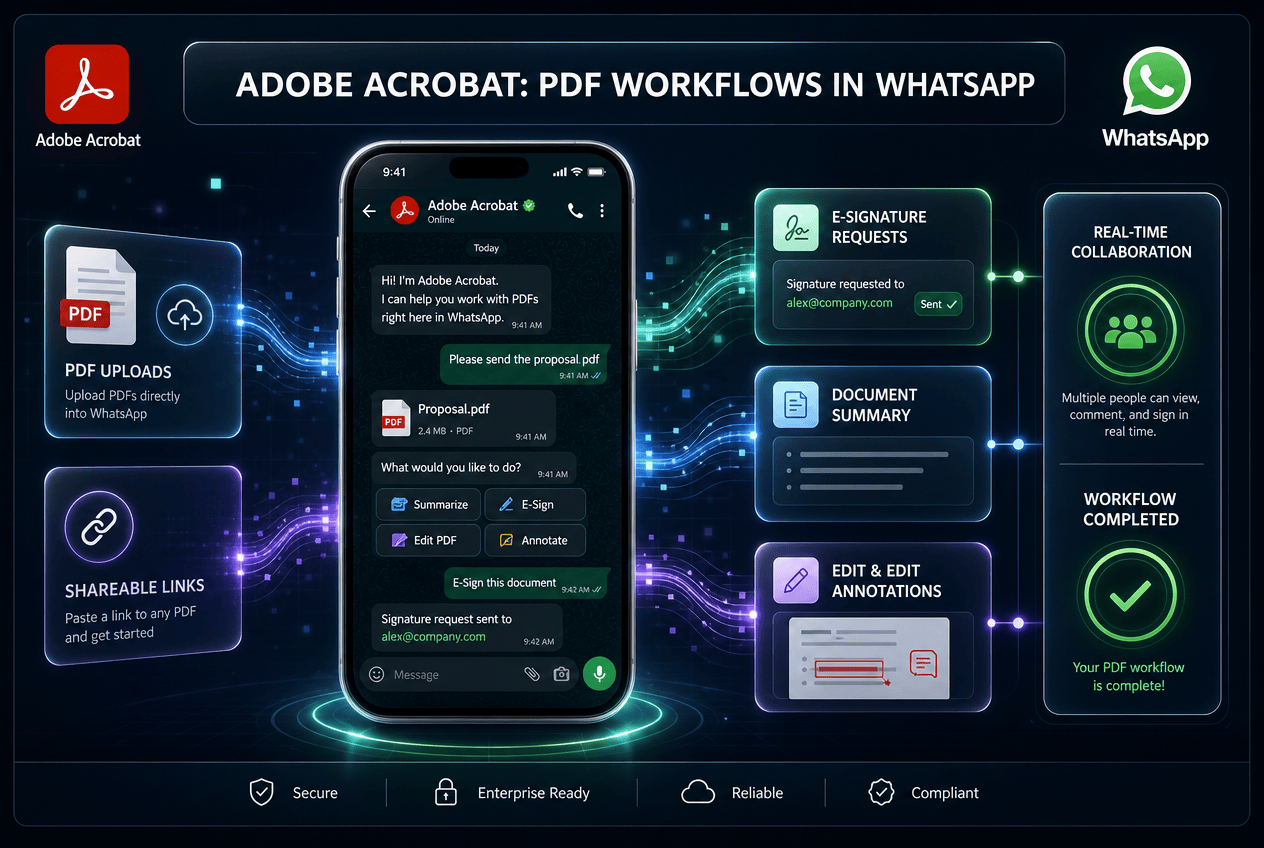
Adobe and WhatsApp have launched an integrated PDF experience directly within WhatsApp Web and desktop applications for Windows. As announced on the Adobe blog in July 2026, the new Adobe Acrobat WhatsApp integration allows users to view, markup, and edit PDF documents without leaving their active chat threads or downloading files to local storage.
WhatsApp serves as a primary operational channel for over three billion global users, many of whom regularly exchange invoices, contracts, and design proposals. Historically, reviewing a shared PDF required switching to an external document reader, saving isolated local files, and manually re-uploading modified versions back into the conversation. This native Acrobat update consolidates those steps into a single desktop interface.
Key Features of the Adobe Acrobat WhatsApp Integration
The updated system embeds essential document management tools directly inside WhatsApp desktop conversation panels. Users can interact with incoming files immediately while maintaining end-to-end encryption across all transmitted media.
The main features included in this global rollout comprise:
- Full-screen PDF rendering that preserves exact visual formatting, custom fonts, and layouts, including full support for password-protected files.
- In-chat markup tools that allow users to highlight key passages, strike through outdated text, draw freehand annotations, and underline specific figures.
- Direct access to advanced editing capabilities via an Edit in Acrobat option that opens the document in the full Acrobat application.
- Integration with Acrobat AI Assistant to generate quick summaries, extract contract terms, and answer structural questions about long documents.
- One-click re-sharing that posts updated or annotated PDF files straight back into the originating message thread.
These features eliminate unnecessary steps for teams that process routine client paperwork. Because the underlying files remain end-to-end encrypted during transfer, sensitive financial details and confidential terms stay secure throughout the review cycle.
Why In-Chat Document Review Matters for Businesses
Constant context switching between messaging channels and separate file management applications causes operational drag. When a client receives an invoice or proposal inside a chat app, downloading the file often delays feedback and prolongs sales cycles. Moving document tools directly into the message window allows both service providers and clients to clear bottlenecks much faster.
For remote operations and agency teams, this unified setup simplifies collaborative approvals. A client reviewing a project draft on WhatsApp Web can highlight scope adjustments, mark outdated items, and return the annotated copy in under two minutes. There is no need to initiate separate email threads or organize multiple draft versions in local download folders.
The inclusion of AI-driven summary tools further speeds up routine document handling. Users with an active Acrobat subscription can instruct the built-in assistant to pull specific payment terms or summarize lengthy service agreements. This reduces manual reading time and enables team members to answer client questions with precise information.
Practical Implications for Messaging and Workflow Automation
While native Acrobat tools manage manual document reviews inside desktop chats, business messaging relies heavily on automated triggers behind the scenes. Modern organizations deliver estimates, dispatch client receipts, and capture approvals using connected CRM platforms and AI automation pipelines.
Consider a service business that uses Make.com to automate project intake. When a prospect submits an estimate request on a landing page, the automated system builds a customized PDF invoice and sends it directly to the prospect’s WhatsApp account. With the new integration active, the client opens the formatted PDF inside WhatsApp Web, adds necessary notes or questions, and returns the marked-up file within the exact same conversation.
Similarly, teams managing communication through Go High Level messaging workflows can distribute onboarding packets and service terms directly through WhatsApp chats. Operations managers can review client file uploads on desktop monitors, add quick inline notes, and sign off on documentation without breaking their daily workflow rhythm.
How Wasif Incorporates Document Workflows into Client Systems
When building custom messaging architectures and backend automation for growing companies, Wasif focuses on removing manual bottlenecks at every stage. Ingesting client documents, gathering formal sign-offs, and syncing records with business database systems require structured data flows that connect messaging platforms directly to operational infrastructure.
The arrival of native desktop PDF tools inside chat apps reinforces the shift toward unified digital workspaces. Wasif designs custom automation setups that generate dynamic PDF documents, handle automated delivery, and update CRM records automatically, ensuring communication remains organized whether staff members manage chats manually or through automated background agents.
If you want to streamline your document handling or connect your client messaging channels with automated backend systems, get in touch with Wasif to discuss your architecture.