Managing business development teams often involves balancing manual data entry against direct prospect communication. In a operational summary published on the Anthropic blog, business development representative John Albert outlined how their team handles account research, lead qualification, and inbox management using AI skills. Before structuring these workflows, Albert spent approximately five hours each day manually responding to inbound inquiries in the sales inbox.
By shifting repetitive administrative work to scheduled automation tasks, sales representatives can spend more time on high-value client discussions. Studying this operational setup provides practical insights into how modern enterprise teams apply AI sales automation to daily pipeline workflows without removing human review.
Structuring Inbound Workflows and Knowledge Repositories
Inbound sales handling requires accurate, repeatable responses to standard technical and product questions. The foundation of Anthropic’s inbound sales process relies on a dynamic knowledge base document. Instead of compiling this manually, the team directed Claude to index product documentation and historical communication channels to aggregate frequently asked questions and verified answers.
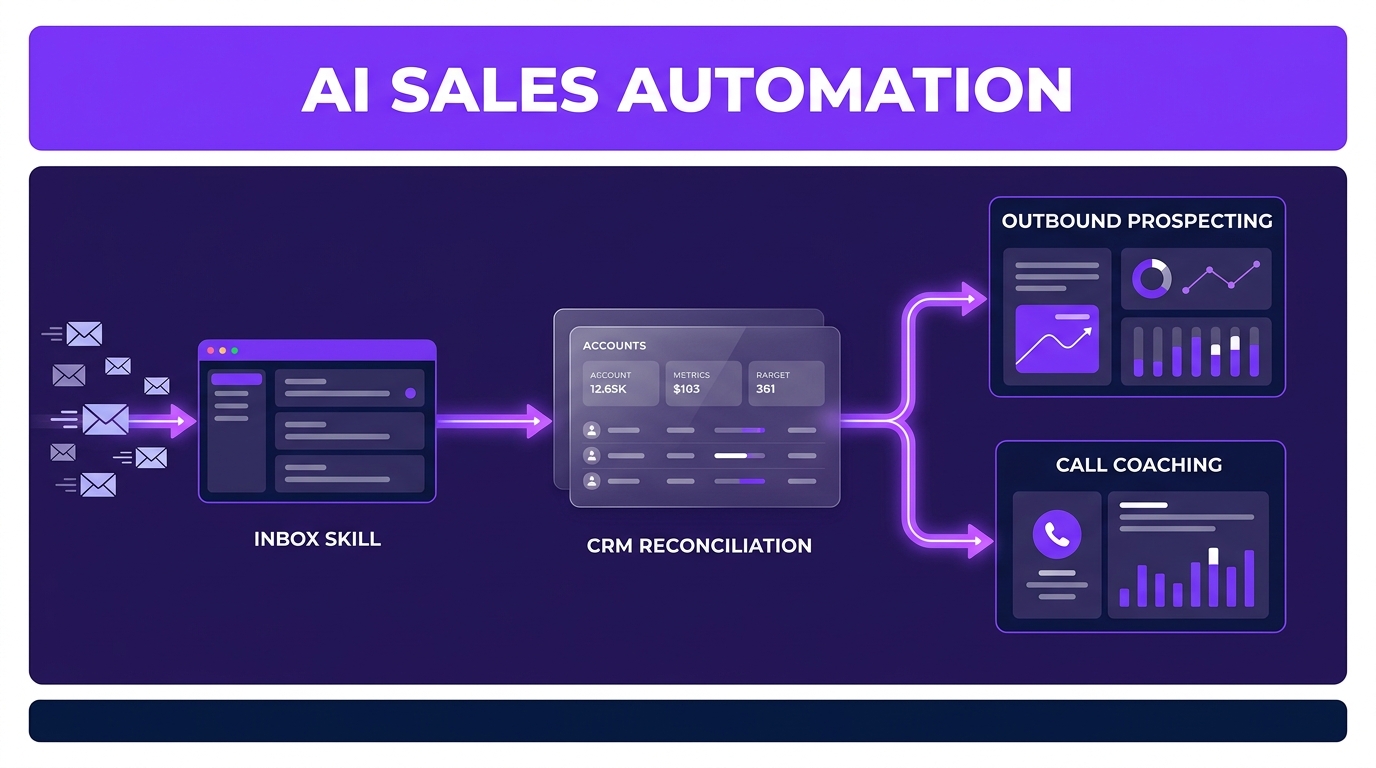
An inbox skill executes every hour to scan incoming email threads in Gmail. The tool evaluates new messages against three primary inputs: a lightweight system prompt, the centralized product knowledge base, and an individual rep voice profile built from historical messages. Rather than sending responses automatically, the system generates draft emails that representatives review, edit, and send manually.
To support calendar management, additional automated routines monitor Gmail and Google Calendar for meeting no-shows. When a prospect misses a scheduled call, the system alerts the assigned representative immediately to trigger a follow-up message. A scheduled CRM scanner also checks for new leads throughout the day, creating customized initial outreach drafts so prospects do not wait extended periods for a response.
Scaling Outbound Prospecting and Pipeline Management
Outbound prospecting often demands significant research time before a representative can craft a single message. Anthropic BDRs manage books of business containing approximately one hundred accounts at any given time. To maintain context across this volume, an automated prospecting task runs overnight across each account portfolio.
The scheduled process connects to multiple data sources, including Salesforce, Apollo, Common Room, Gong, and internal data warehouses. The system evaluates current account engagement, verifies key contacts, and cross-references active signals against ideal customer profile criteria. Each morning, representatives receive account briefs that include engagement scores, context summaries, and suggested outbound strategies. A feedback ledger records rep edits over time to avoid duplicate research and refine future recommendations.
- Data Integration: Aggregates activity signals from CRMs, call recordings, and product warehouses.
- Human Verification: Requires explicit rep approval on draft emails and pipeline stage modifications.
- Call Coaching: Evaluates Gong call transcripts against sales playbooks to generate structured feedback.
Pipeline hygiene is maintained through an automated Salesforce reconciliation skill. The system compares sales guidelines against recent call transcripts in Gong and email exchanges in Gmail. If a conversation progresses into pricing details, the tool proposes a CRM opportunity stage update backed by specific transcript evidence. Representatives approve, adjust, or reject the update, and the system logs rejection reasons to refine future stage recommendations.
Handling Ad-Hoc Analytics and Account Sweeps
Beyond scheduled inbound and outbound cadences, business development teams frequently receive unexpected requests from account executives. Anthropic’s team uses targeted prompts to generate spend analysis reports and product usage dashboards on demand without submitting requests to data teams.
One specialized query checks an account executive’s entire portfolio for undiscovered usage. The routine scans data warehouses for active product usage in accounts where no official sales opportunity exists in the CRM. Identifying these active non-opportunity accounts creates immediate targets for warm outreach.
Similar ad-hoc sweeps support targeted event outreach. For example, when organizing product-specific webinars, an account sweep cross-references CRM contact histories with usage data to score accounts against target attendee criteria. The query returns a prioritized contact list tailored specifically for event invitations.
Key Considerations for Sales Teams
Implementing structured AI tools across business development functions requires clean underlying documentation. Teams must establish clear standard operating procedures and verified answer repositories before deploying automated drafting tools. Without accurate documentation, AI tools risk generating incorrect product details in outreach drafts.
Data privacy and governance require strict approval boundaries. Requiring representatives to review CRM stage changes and approve outgoing emails prevents automated errors from reaching prospects or corrupting database records. API connections between CRMs, data warehouses, and email providers must also maintain tight permissions.
System performance relies heavily on continuous feedback loops. Recording why a representative rejected a proposed CRM update or modified an email draft ensures the underlying prompts adapt to real-world sales scenarios over time.
FAQs
How does AI sales automation draft personalized email responses?
AI sales automation tools draft personalized responses by combining three main inputs: a lightweight system instruction prompt, a centralized product knowledge base, and an individual writing style profile. The tool reads incoming emails, references verified product facts, and formats the output to match the representative’s tone before saving the text as a draft for review.
Can AI tools update CRM opportunity stages automatically?
AI tools can analyze email threads and call transcripts to evaluate whether an account has met specific stage criteria. However, reliable configurations present proposed stage changes along with supporting evidence to human representatives for approval, ensuring CRM data remains accurate without manual manual entry.
What data sources are required for AI prospecting workflows?
Effective AI prospecting workflows typically connect a CRM like Salesforce with data warehouses, call recording software like Gong, and prospecting databases such as Apollo or Common Room. Combining these platforms gives the system complete visibility into historical communication, user behavior, and contact information.
How do sales teams maintain quality control over automated outreach?
Teams maintain quality control by keeping human review steps in place for all prospect-facing communication and database changes. Representatives verify draft text, adjust messaging for specific context, and log feedback whenever a generated draft or CRM recommendation requires correction.
What This Changes for Client Builds
Wasif designs custom workflow integrations that connect platforms like Go High Level and internal databases to streamline client communication. Building structured lead capture and response logic allows growing teams to process inbound interest quickly without increasing manual overhead.
When implementing AI automation systems, Wasif focuses on establishing solid data pipelines, clear approval loops, and reliable CRM updates tailored to specific business requirements. Connecting communications with organized data structures ensures sales operations run consistently across every channel.
If you want to streamline your sales operations or build customized CRM workflows for your team, reach out through the contact page to discuss your project.