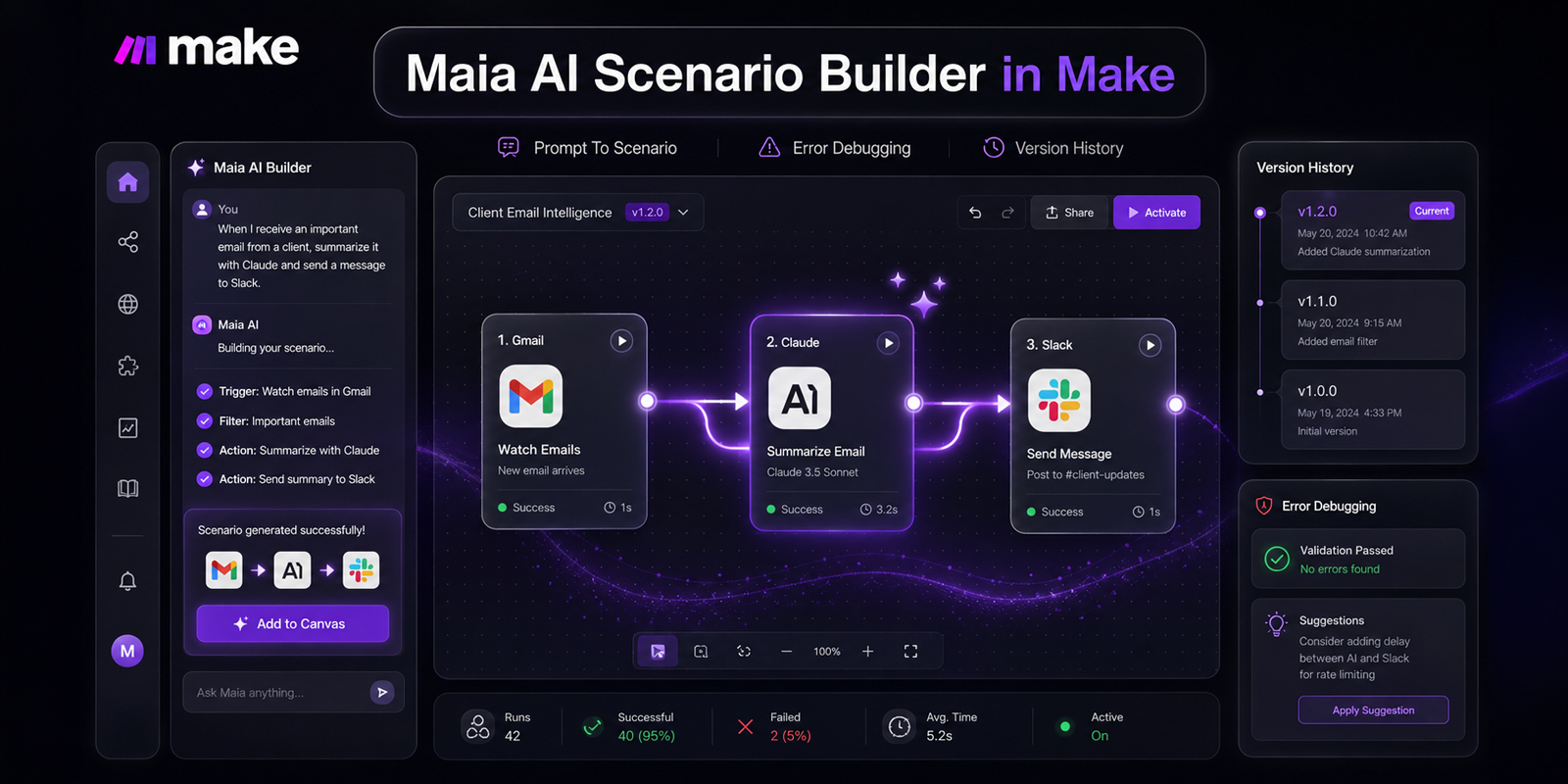
Make has introduced Maia by Make, an AI assistant integrated directly into the scenario builder to help users create, update, and troubleshoot automated workflows. The feature is currently available in closed beta for all paid plans, while free plan users receive a four-week trial starting from account signup. This release brings conversational interaction into the visual builder canvas, allowing users to build structures using plain language prompts.
Key Capabilities of Maia by Make
The AI assistant handles three primary technical tasks inside the visual editor: creating new scenarios, updating existing module configurations, and identifying workflow errors. Rather than manually placing and configuring every module, users can outline a process in text and let the system generate the visual pipeline.
- Scenario creation: Builds new multi-step automation flows and AI agent structures based on written functional goals.
- Scenario modification: Adds new app modules, adjusts settings within individual module configurations, and expands existing flows.
- Troubleshooting and debugging: Explains error messages that occur during scenario building and applies direct fixes to module logic.
- Version control: Tracks changes made during the chat session, allowing builders to review previous states and click to revert to a specific version.
How the Chat Interface and Workflows Operate
Users interact with Maia by Make through a side panel in the builder canvas by clicking the scenario creation button. The system maintains conversation sessions for 15 days, enabling users to return to previous build sessions and pick up where they left off. If a chat session becomes cluttered, builders can clear the history from the chat menu options.
According to the official Make documentation, detailed prompts produce the most accurate scenario structures. Prompts that specify the exact trigger conditions, target applications, and intermediate steps give the system clear parameters to build against. For instance, a user might prompt the system to watch incoming Gmail messages with a specific label, summarize the content using Claude, and post the summary to a Slack channel.
Other functional prompt examples include configuring sentiment analysis on customer email replies using OpenAI and saving output records into Airtable, or monitoring Salesforce for closed deals to create project tasks in Asana and trigger onboarding emails.
Credit Usage and Data Privacy Commitments
A notable aspect of this update is the usage structure. Make states that chat interactions with the assistant, including messaging and scenario modifications, are free and do not consume plan operations. Credits are only used when scenarios and individual modules run execution tasks.
Regarding data security, the platform documentation confirms that user chat data and scenario structures are never used to train or fine-tune underlying AI models. This commitment ensures that proprietary business logic and internal data configurations remain private within the user organization.
Practical Implications for Builders and Businesses
For teams building complex systems, conversational building speeds up the initial prototyping phase. Drafting complex data mapping or multi-branch logic often requires manual setup time. Having an assistant generate the baseline scenario architecture reduces setup friction.
The integrated error handling also lowers the technical barrier for team members who are learning scenario maintenance. When an error occurs during building, asking the assistant to explain the failure helps operators isolate misconfigured webhooks, missing parameters, or invalid data types without leaving the builder workspace.
Where Maia Fits in Real Projects
Wasif builds custom automation systems, Go High Level setups, and scalable web solutions for growing businesses. In practical platform implementations, AI tools inside scenario editors help rapidly scaffold initial integration structures before adding advanced error handlers and custom data rules. You can explore more about custom integration design on the AI automation services page.
While automated scenario generation provides a strong starting point, complex production systems still benefit from thorough testing of data payloads, rate limits, and edge-case exceptions before going live.
Outlook for Platform Builders
The introduction of in-builder assistance reflects a broader trend toward conversational workflow design across enterprise integration platforms. As the closed beta expands, feedback from builders will likely shape how deeply the assistant can inspect external payloads and handle complex branching logic.
Businesses currently using paid Make accounts can test the assistant inside their workspace immediately, while free accounts can evaluate the functionality during their initial trial window.
Need help setting up reliable integration systems for your business? Reach out to Wasif at https://wasifahmed.dev/contact/ to discuss your project requirements.